
The gap between a clinical workflow diagram and a FHIR API load number is where a lot of sizing exercises stall out. Workflow designers describe patient journeys; capacity planners want requests per second. Neither side has the vocabulary to trade the other's currency, and the sizing meeting turns into a translation exercise instead of a decision meeting.
Building a shared translation model closes the gap. For related capacity walkthroughs, related FHIR breakdowns collects the surrounding material. This piece is about how the translation actually happens.
Start With the Workflow Event
The atomic unit on the clinical side is the workflow event. A clinician opens a chart. A nurse charts a set of vitals. A lab result posts to a patient. Each event is a specific action with a specific frequency in the clinical day.
List the workflow events for the deployment. Assign each one an expected frequency per active user per hour. That list becomes the input to every downstream calculation.
Expand Each Event Into API Calls
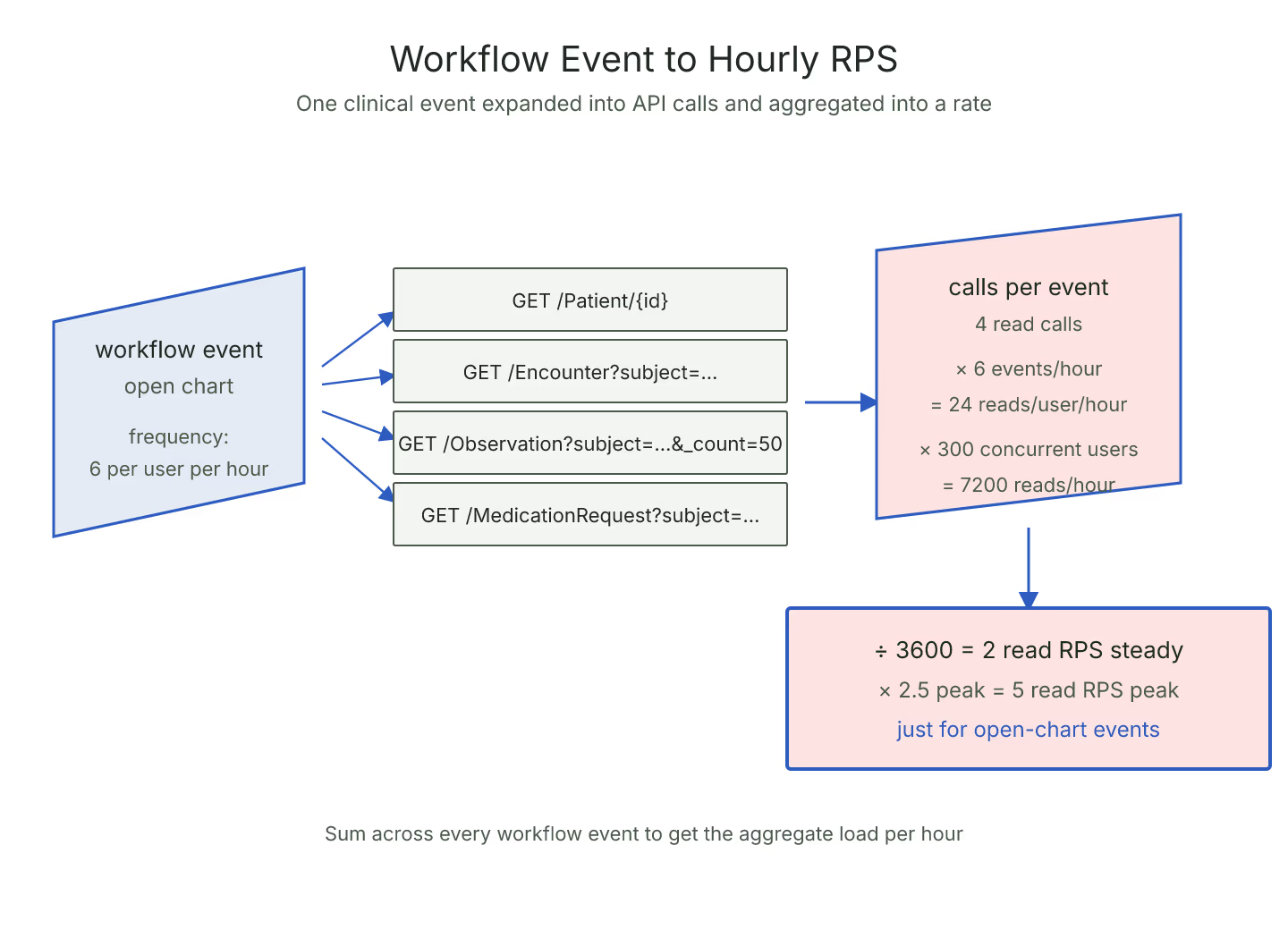
The translation step is expanding each event into concrete FHIR API calls. Opening a chart might expand into a Patient read, a search for Encounters, a search for active Conditions, a search for MedicationRequests, and a set of Observation searches. Each of those is a countable API call.
The expansion depends on the client implementation. A well-designed client uses _include to fold references into a single response; a chatty client fires each reference as its own call. A pass through the site's FHIR server throughput sizing widget can bracket the load once the expansion is named.
Multiply Through the Formula
Once every workflow event has a call count, the aggregate load is straightforward. Sum the call counts across events for one user per hour, multiply by active users per hour, divide by 3600 to get per-second. Multiply by the peak multiplier for the peak-hour number.
For the underlying read formula in its own right, the numbers you actually need to estimate FHIR read RPS walks through each input separately.
Split the Reads and Writes at the Event Level
Every workflow event should carry its read and write counts separately. Chart open is nearly all reads; vitals entry is nearly all writes; order entry is a mix. Splitting the ratio at the event level lets the aggregate ratio drift naturally as the mix of events shifts.
Naming the ratio per event also surfaces the events that dominate the write load. Sometimes the surprising event is a background job the clinical team barely notices, like a nightly analytics export that fires ten thousand reads and no writes. For the mixed workload framing, planning read/write ratio for a mixed FHIR workload covers the aggregation method.
Reserve for Async Cascade Load
Some workflow events trigger async cascades that show up as API load minutes or hours later. A completed order fires a subscription that triggers a downstream update, which fires its own subscription. Those cascades count against the sizing plan even though they are invisible in the workflow diagram.
Add a cascade budget to the plan, sized as a percentage of the direct write load. Fifteen to twenty percent is a reasonable starting point for a deployment with active subscriptions.
Validate Against a Small Real Sample
Once the translation model is written, validate it against a small sample of real traffic. Instrument the client for a day, count the actual calls per workflow event, and compare against the model. Discrepancies of more than twenty percent are worth investigating.
The validation loop is what makes the translation model reliable. Models that are never validated tend to drift with unnoticed workflow changes. A workflow-to-load translation model that is calibrated against real traffic once a quarter stays useful across releases.
Naming the translation explicitly is the shortest path to a sizing conversation that ends in a decision rather than another meeting.
Sources
- HL7 FHIR core specification of HTTP interactions covering - HL7 FHIR core specification of HTTP interactions covering read, write, and search calls fired per workflow event