

Read RPS estimates for a FHIR API tend to arrive dressed as a single confident number. In practice the honest estimate is a product of a small set of inputs, and knowing which inputs matter is the difference between a sizing exercise that converges and one that spins for weeks. The math is not the hard part; the hard part is naming the inputs cleanly enough that the number is defensible.
If you are still framing the whole sizing exercise, the FHIR coverage hub sits alongside this piece on the home page. This one stays with the concrete inputs.
Concurrent Active Users
The starting number is how many users are using the workflow at the same time. This is not the same as licensed users or provisioned accounts; it is the number who are actually active in any given minute during peak hours. For most clinical workflows the concurrent number is a small fraction of the licensed count.
Undercounting concurrent users is the most frequent sizing mistake. Overcounting is expensive but recoverable; undercounting shows up as slow responses under load and forces an emergency scale-out. A pass through the site's FHIR server throughput sizing widget can turn a concurrent-user number into a first-pass RPS bracket.
Actions per User per Minute
The second input is how many workflow actions a single active user triggers per minute. A charting workflow may fire an action every ten seconds; an inbox-review workflow every two. The ratio between these depends on the interface and the clinical task, not on the FHIR spec.
Ask the workflow designer directly. If the answer is "we don't know yet", pick a range with a low and high estimate and stick with the pair through the rest of the math.
Reads per Action
Every workflow action expands into some number of FHIR reads. Loading a patient chart is maybe fifteen calls: the Patient resource, several Encounters, dozens of Observations, active MedicationRequests, and open Conditions. A quick lab lookup is two or three calls.
If the workflow is not fully designed yet, the reads-per-action number is the one that swings sizing the most. Cutting it in half or doubling it changes the answer by a factor of two, and the workflow designers are usually the only ones who can call it. For the wider translation from clinical workflow to reads, translating clinical workflow into FHIR API load covers the method.
Peak Multiplier
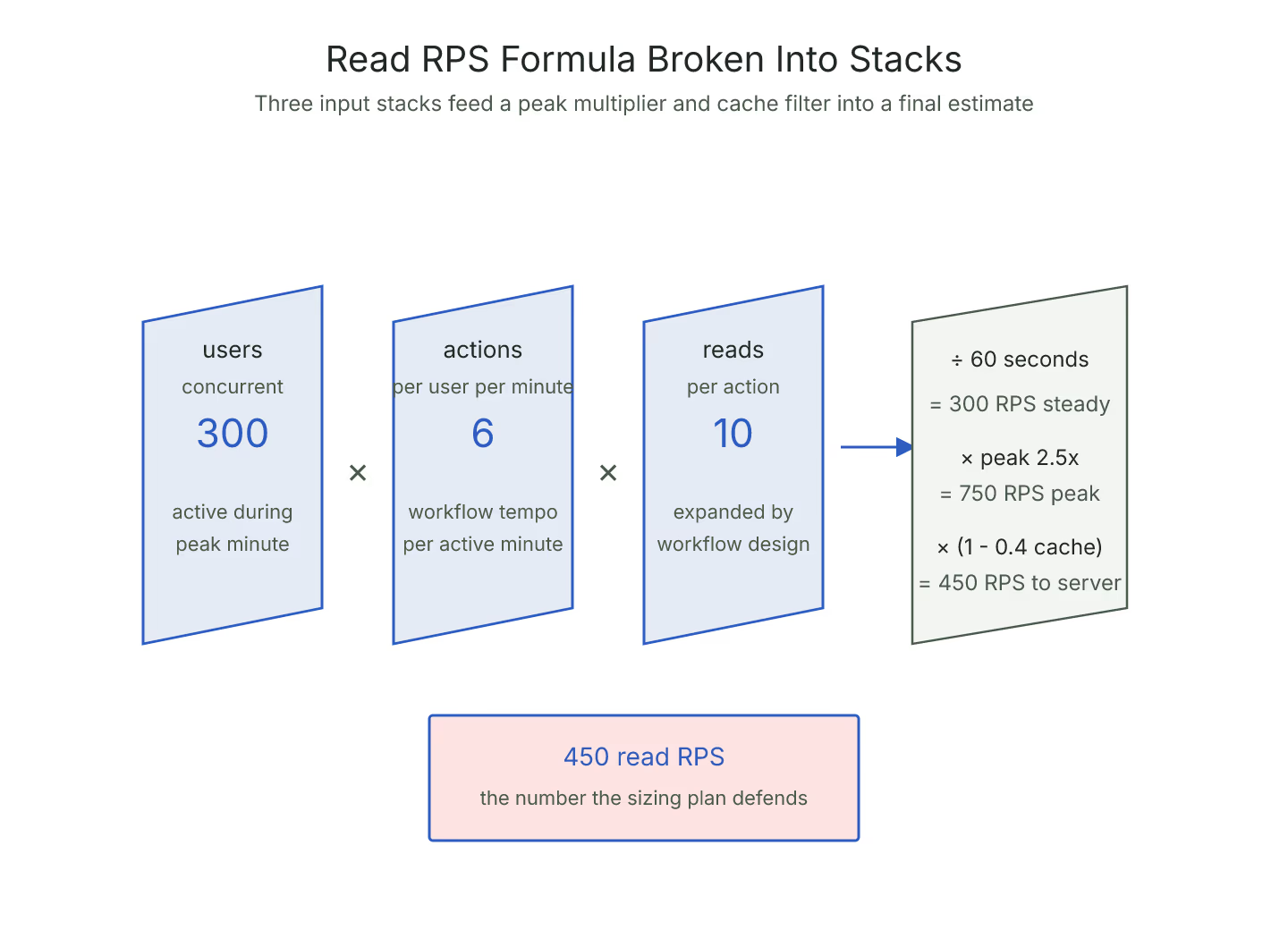
Averages hide bursts. The formula for a steady-state RPS estimate is:
- concurrent users × actions per user per minute × reads per action / 60
That number is the steady-state read RPS. Multiply it by the peak-to-average ratio to get the number you actually size against. For a typical clinical workflow the ratio is around two to three; for burst-prone workflows it is higher.
Read Caching Efficiency
The last input is how much of the read traffic is served from cache. Reference-data reads (CodeSystems, ValueSets, StructureDefinitions) cache well. Patient-scoped reads (Observations, Encounters) cache poorly unless the workflow revisits the same patient inside the TTL window.
Estimate a cache hit ratio and subtract it from the raw number. A cache hit ratio of forty percent turns a 500 RPS raw estimate into a 300 RPS number that actually hits the FHIR server.
The Formula in One Line
Steady-state read RPS = (concurrent users × actions/user/min × reads/action / 60) × peak multiplier × (1 - cache hit ratio)
Every input is a knob. Named cleanly, the formula converges. For the separate write side of the same conversation, why FHIR write RPS is not the same as read RPS covers the different formula that applies once resources start changing state.
Sources
- HL7 FHIR core specification of search interactions - HL7 FHIR core specification of search interactions, canonical reference for read-path RPS math